Showing posts with label latest solutions of cell problems. Show all posts

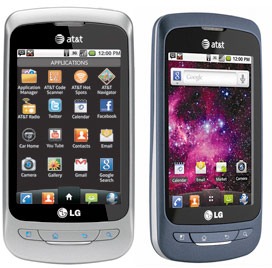
LG THRIVE HARD RESET, WIPE DATA TO FACTORY DEFAULT SETTINGS

LG Thrive Hard Reset
Here's a step by step instructions on how to hard reset the LG Thrive (for AT&T mobile USA).
2G Network GSM 850 / 900 / 1800 / 1900
3G Network HSDPA
OS Android OS, v2.2 (Froyo)
CPU 600 MHz ARM 11 processor, Adreno 200 GPU, Qualcomm MSM7227 chipset

Precautions: Performing hard reset process will delete or wipe all data from the. We highly recommend to have a back up copy of all your important files stored on the device.

LG Thrive Factory Data Reset procedures:

1. On the main home screen, tap menu
2. Select Settings, then Privacy
3. Select Factory data reset
4. Select Reset phone
5. Enter the password if prompted, then select Erase everything.

If the LG Thrive is frozen: Reboot or restart the phone and do a hard reset through button combination.

1. Turn the power off. , take the battery out and reinsert it back again
2. Hold the Volume Down and Power Button
3. A menu will then show up such as Fastbook, Recovery, Clear Storage, and Simlock
4. Select Clear Storage by pressing the Volume Down button
5. Press and release the Power button
6. Select: Volume Up for YES and Volume Down for NO

Wait 'till the phone reboot, once the wipe process completes, the LG Thrive will return to its original factory fresh state default settings.
All data including third-party applications will be deleted from the LG Thrive . You may need to re-install it back again.

NOKIA C5-03 FORMAT SOFT/HARD RESET TO FACTORY SETTINGS

Here's the instruction on how to format or reset the Nokia C5-03 to factory fresh default settings.
Note: This may only advisable if the phone experiencing frozen or hang problems, burned out by excessive use or installing 3rd party applications. You may need to back up all important data stored on the phone before you proceed, this process will delete the files you installed on Nokia C5-03.


Nokia C5-03 Soft Reset:
This will not harmed your data . Soft reset only restores .ini files from Flash ROM on board memory of your Nokia C5-03.

1.). Dial *#7780#

2). Press Ok/Yes

Nokia C5-03 Hard Reset
This will delete your data and installed applications. Hard reset will restore your Nokia C5-03 to default factory setting.

1). Turn off Nokia C5-03

2). Take out the battery and reinsert it, turn it on

3). Dial *#7370#

4). Press Ok/Yes

Nokia C5-03 Hard Reset through button combination.

1). Turn Off the Nokia device

2). Pull out the battery and reinsert it back again, then Power it ON

3). Simultaneously press and hold *+3+Call Button (green/ok button)

Enable The Native Panorama Camera Mode On iPhone 4S, iPhone 4, iPad 2, iPod touch Running iOS 5 Without Jailbreak


You may have caught our earlier report regarding the Firebreak jailbreak tweak, which allows those with jailbroken devices to access a hidden panoramic camera feature which didn’t quite make the final cut of iOS 5.0.


Now, those of you on iOS 5, with an itch to perform a hack without having to jailbreak the device, you can now enable the hidden-yet-native panorama option for your camera’s device, using a very simple hack. This will work on any Gyroscope capable device, including iPhone 4S and iPad 2. We’ve enclosed a guide on how this can be achieved, so follow carefully, and you’ll be taking panoramic snaps lickety split!

Step 1: Backup your device’s data in iTunes. This is not the usual precautionary measure, you’ll actually need to modify this backup in order to perform the hack.

Step 2: Download iBackupBot from here. It’s compatible with both Windows and Mac.

Step 3: Once it’s finished downloading, install and launch.

Step 4: Locate your com.apple.mobileslideshow.plist file, as depicted below.

Step 5: Double click the file which will take you to the editing page.

Step 6: Directly below DiskSpaceWasLow , add EnableFirebreak then hit the disk icon to save.

Step 7: Restore to your backup via iTunes.

Step 8: The process is now complete. Launch the Camera.app, navigate to Options and click on Panorama to begin shooting images in panorama mode.

Having tested it, we can confirm that it works well, although for those who don’t like the idea of editing .plist files, you can always download Panorama 360 or Panoramatic, Microsoft’s Photosynth via the App Store, which work to similar effect. Be sure to check out our iPhone Apps Gallery and iPad Apps Gallery to explore more apps for your iPhone, iPad and iPod touch. You can follow us on Twitter, add to your circles on Google+, or join our Facebook fanpage to keep yourself updated on all the latest from Microsoft, Google and Apple.

FireBreak - Enable Hidden Panorama Mode In iOS 5 For Iphone4 Or iPad2:

Windows Phone 7.5 Mango ‘makes the iPhone 4 look out of date’


With the release of Nokia Windows Phones imminent and the recent Windows Phone 7.5 Mango update impressing critics worldwide, we're more excited than ever to see on just how great the new Nokia Windows Phones are sure to be. And we've also noticed how many rivals are losing their grip in the smartphone market and may soon be overtaken by the every-improving Windows Phone OS.

Windows Phone 7.5 Mango:
Following the release of the iPhone 4S earlier this week, many have noticed that Apple’s share of the smartphone market has fallen of late, with rivals quickly snapping at its heels and, in some cases, overtaking it completely. With Windows Phones now proving more impressive than ever and the coming range of high-quality Nokia Windows Phones on the way later this month, competition in the smartphone market has never been hotter.

As the latest Windows Phone 7.5 Mango update packs in market-leading features and improves usability beyond anything we’ve seen before, it has even led some critics to note that Windows Phone is now making handsets from many rivals look a bit long in the tooth. The Guardian’s Telecoms Correspondent Juliette Garside, in particular, likes what Windows Phone brings to consumers, noting ‘I believe [Windows Phone] will raise the bar...Mango's graphic design, the deep integration of popular tools such as Facebook and Twitter, and its ease of navigation make the iPhone 4 look out of date’.

As the release of Nokia Windows Phones get ever nearer, we can’t wait to see just what Nokia will have for us in the weeks to come. But what do you think? Are you just as excited to see Nokia’s Windows Phones as we are, or are you a die-hard Symbian fan and not yet won over by the latest choice of smartphone OS? Why not let us know your thoughts below.

Windows Phone Mango 7.5 review:


iPhone 4 Review:


Blackberry Torch 9800 Hard Reset, Wipe and Restore to factory default settings procedures


This process will delete all stored data stored on your Blackberry Torch 9800, ensure to back up it first before proceeding.

To Reset Settings of Blackberry Torch 9800
1. From the Home screen, press the Menu key.
2. Select Reset Settings.
3. Check the settings you wish to set to default:
Wallpaper, Layout, Download Folder,Icon Arrangement.
4. Click Apply, then Yes to confirm.

To Hard Reset Blackberry Torch 9800, The BlackBerry Torch manual describes a hard reset as fulling the battery out for about 10 seconds, then reinserting the battery back into the device again. But, this does not clear up many temporary issues with the device, there are other resets procedure you can perform.

Soft Reset: Press ALT + RIGHT SHIFT(CAP) + DELETE.

Double-Soft Reset: Press ALT + RIGHT SHIFT(CAP) + DELETE . The screen will go blank for a few seconds. When the screen comes back on, immediately press ALT + RIGHT SHIFT(CAP) + DELETE again.

To Wipe All Data stored on Blackberry Torch 9800
1. Select the Options app under the All tab.
2. Select Security.
3. Select Security Wipe.
4. Check the items you wish to remove:
Emails, Contacts, etc, User Installed Applications & Media Card.
5. Type blackberry in the box, then tap Wipe.

The device will then take a few minutes to wipe all of the data. The BlackBerry Torch 9800 will then reboot restore to factory default state settings.

To Reboot/Reset BlackBerry Torch 9800:
If BlackBerry Torch device is frozen or unresponsive, you’ll of course want to restart it. You can do it by pulling out the battery, but there is a simple keystroke you can use to reboot. Just press the Left Shift, Alt and Delete buttons simultaneously. The device should then restart.

Free Cellphone Repair Tutorial Sitemap

This is where you can learn a step by step from basic to advance procedure on how to fix major mobile phone handsets problems such as Nokia, iPhone, Blackberry, Samsung, SonyEricsson, Motorola, HTC, Android,LG, Siemens, Benq and etc. for absolutely 100% Free.

All lessons herein were all simplified and a few general technical terms being reduced to make easy learning and understanding, Images and Pictures were also gathered and choose appropriately to support every aspects of learning. These tutorials covers the following step by step lessons:

LESSON 01
Basic Information How Cellphone Works?
Learning with Block Diagram on How basically Cell-phone works?

LESSON 02
Introduction To Basic Electronics
Ohm's Law, Series Circuit,Parallel Circuit, Identifying Electronics Components and Circuit Symbols, Resistors, Capacitors, Transistors, Diodes, Fuse, Coils & Inductors, Crystal Oscillators, RF & IF Amplifiers and Filters, EMI and ESD Filters,

LESSON 03
Preparing the Proper Tools For Repairing, Opening Tools and Tweezers, Soldering and Desoldering Tools, Muti Tester, SMD Rework Stations, DC Power Supply, Cleaning Kits, Reballing Kits, Working Table Equipments.

LESSON 04
Safety Procedures and Proper Handling of Tools and Test Equipments on Cellphone Repair
How To Use and Read a Multimeter Tester
Test and Check up Procedures on Basic Electronics Components

mobile phone repair, phoneinc: