To Hard Reset the Motorola BLUR MB300 quite differs from other Motorola ANDROID phones.
Do back up all your data stored on your device before doing this procedure, this process will delete all the data on the phone but does not delete the data stored on the microSD memory card.
To hard reset Motorola BLUR MB300
1. Power off phone.
2. Hold camera button and power on phone at the same time.
3. Release the camera button when prompted to.
4. You will see a message screen telling you to press the up or down volume button
5. Press and HOLD the down volume key (ignore message 'Volume Up Key Pressed')
6. When triangle and phone screen appears
7. Press on the screen just above the back key
8. You will now see the "Motorola system recovery" menu
At this point you will have three choices:
1. reboot system now [Menu+Back]
2. apply ssdcrad:update.zip [Alt+S]
3. wipedata/factory reset [Alt+W]
You can simply tap an item to select it.
At the bottom of the screen you can select OK to apply your choice from the menu.
There is also an opportunity to select Hide on the bottom left, I don't know what that does (I tried it and nothing happened).
Selecting Wipe data/factory reset and tapping Ok and the screen changes to a box and a phone (Get it - out of the box) and you see what is happening on the phone.
pick 2
-- Wiping data...
Formatting DATA:...
Formatting CACHE:...
Data Wipe Complete.
Press Menu+Back to reboot
pressing Menu+Back did nothing for me so I tapped 'reboot system now' on the menu and Ok.
The phone restart then will restore back to its factory default state.
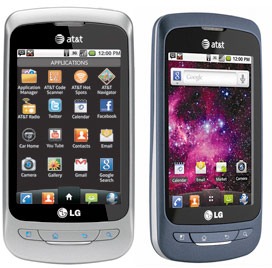
Here's a step by step instructions on how to hard reset the LG Thrive (for AT&T mobile USA).
2G Network GSM 850 / 900 / 1800 / 1900
3G Network HSDPA
OS Android OS, v2.2 (Froyo)
CPU 600 MHz ARM 11 processor, Adreno 200 GPU, Qualcomm MSM7227 chipset
Precautions: Performing hard reset process will delete or wipe all data from the. We highly recommend to have a back up copy of all your important files stored on the device.
LG Thrive Factory Data Reset procedures:
1. On the main home screen, tap menu
2. Select Settings, then Privacy
3. Select Factory data reset
4. Select Reset phone
5. Enter the password if prompted, then select Erase everything.
If the LG Thrive is frozen: Reboot or restart the phone and do a hard reset through button combination.
1. Turn the power off. , take the battery out and reinsert it back again
2. Hold the Volume Down and Power Button
3. A menu will then show up such as Fastbook, Recovery, Clear Storage, and Simlock
4. Select Clear Storage by pressing the Volume Down button
5. Press and release the Power button
6. Select: Volume Up for YES and Volume Down for NO
Wait 'till the phone reboot, once the wipe process completes, the LG Thrive will return to its original factory fresh state default settings.
All data including third-party applications will be deleted from the LG Thrive . You may need to re-install it back again.
Here's a step by step instruction on how to hard reset the Motorola DROID X2 with step by step instructions.
Note: We highly recommend to have a back up copy of all your important files stored on the device.Performing hard reset process will delete or wipe all data from the.
Motorola DROID X2 Factory/Soft Reset:
On the main Home Screen,
1. select MENU
2. select SETTINGS
3. select PRIVACY
4. selectFACTORY DATA RESET
5. select RESET PHONE
6. Enter the password
7. select ERASE EVERYTHING
If the Motorola DROID X2 is frozen: this may sometimes occurs when running multiple applications and the device become unresponsive, you may fix this by rebooting the device or removing the battery for a while.
Motorola DROID X2 Hard reset through button combination for sever freezing problem., this will prompt you into recovery mode.
1. Turn the power off or remove the battery and reinsert it back again after a couple of seconds.
2. Press and hold the POWER+CAMERA buttons at the same time
3. Release the Camera button when prompted
4. Press and hold the Volume Down key
5. It will show A yellow exclamation display
6. Select the Wipe data/factory reset (Alt + W) option
Wait 'til the phone completely reboots. That's it...
Here's the instruction on how to format or reset the Nokia C5-03 to factory fresh default settings.
Note: This may only advisable if the phone experiencing frozen or hang problems, burned out by excessive use or installing 3rd party applications. You may need to back up all important data stored on the phone before you proceed, this process will delete the files you installed on Nokia C5-03.
Nokia C5-03 Soft Reset:
This will not harmed your data . Soft reset only restores .ini files from Flash ROM on board memory of your Nokia C5-03.
1.). Dial *#7780#
2). Press Ok/Yes
Nokia C5-03 Hard Reset
This will delete your data and installed applications. Hard reset will restore your Nokia C5-03 to default factory setting.
1). Turn off Nokia C5-03
2). Take out the battery and reinsert it, turn it on
3). Dial *#7370#
4). Press Ok/Yes
Nokia C5-03 Hard Reset through button combination.
1). Turn Off the Nokia device
2). Pull out the battery and reinsert it back again, then Power it ON
3). Simultaneously press and hold *+3+Call Button (green/ok button)
The cell phone is an important device for many people. Many people experience problems with their mobile service, and are unsatisfied with their service provider. According to Consumer Reports, cell phone service is one of the lower-rated services in the past six years. Limited coverage or network One of the problems that people experience with their mobile service is the limited coverage. There are certain areas in the house, such as the basement, where their cell phones don't get reception. There are also places without cell phone reception, even in wide open spaces, and these are generally called "dead cell phone zones."
Customer Service Another complaint that service providers get is in regards to customer service. Customers complain that agents working for service providers are not very helpful when discussing issues about their phones and plans. A cell phone service provider, Sprint, said that even if they have tried to solve customer issues, customers may continuously contact the company for complaints even as many as 100 times a month.
Automatic fees Customers may notice that their cell phone bill is higher on a certain month, possibly because of fees that the service provider tacks on without their knowledge. This may include fees for additional services the customer didn't sign up for. To avoid having to pay for these fees, customers may need to check the itemization of their bill and contact their providers to take some services off.
Penalties Another problem with mobile service providers is the penalties charged. Many view early termination fees as unfair, where consumers have to pay service providers amounts up to $200 for canceling their contracts. Other fees include activation fees and number portability fees.
Solutions Cell phone providers have decreased early termination fees and have now implemented pro-rated fees for canceling contracts early. In terms of coping with limited network, cell phone service providers have interactive online coverage maps by which consumers can check signal strength in the areas they spend the most time in. Customers may also switch service providers to one that suits them better.
Mobile IP, the outcome of the convergence of mobile communication technologies and the IP network, is the core technology to implement NGN applications in traditional networks. It supports network mobility, two-way access, and real-time multimedia services.
As a recommended Internet standard, Mobile IP is the earliest solution to mobility management of IP network. The IETF (Internet Engineering Task Force) gives a complete description of Mobile IP in RFC2002. Along with the development of IPv4 to IPv6, Mobile IP is also evolving to Mobile IPv6.
Problems with Mobile IP:
Although growing rapidly, Mobile IP still has the following problems:
(1) "Triangle routing" Problem
The Communication Host (CH) has to send packets to the Mobile Host (MH) via the Home Agent (HA), while the MH sends packets directly to the CH. As the communication in the two directions follows different routes, the problem of "triangle routing" arises, which leads to low efficiency especially when the MH is far away from the HA and the CH is near to the MH.
(2) Handoff Problem
Handoff problem means that the HA sends the IP packets of the MH to the original foreign network via the tunnel because it doesn’t know the latest Care of Address (CoA) of the MH during the period starting when the MH leaves the original foreign network and ending when the HA receives the new registration address of the MH. As a result, these dropped IP packets have an influence on the communication between the MH and the CH especially when handoff occurs frequently or the MH is far away from the HA.
(3) Problem of Intra-Domain Movement
The frequent intra-domain movement of the MH within a small area will lead to frequent handoff. Consequently, a great amount of registered messages are generated in the network and the network performance is greatly affected.
(4) QoS Problem
In the mobile environment, it is hard to provide QoS over Mobile IP due to dynamically varying wireless network topologies, limited network resources, unpredictable effective bandwidth and high error rate.
Solutions:
Solution to "Triangle Routing" Problem For Mobile IP, routing optimization is necessary because all packets sent to the MH shall pass through the HA but the route may not be the best. After receiving the packets sent by the CH to the MH, the HA notifies the CH of the binding information about the MH, i.e., the current Foreign Agent (FA) address of the MH, and the CH encapsulates the packets and establishes the tunnel to the FA for transparent transmission. The binding information is transferred via a definite port number. If the MH moves again, the new FA will transfer the updated binding information to the old FA to ensure that the packets are transferred to the new FA. And meanwhile the HA gets the updated binding information so the subsequent packets will be transferred directly from the CH to the new FA. The mobile IP with route optimization sets high requirements on the CH. The CH shall have the ability to obtain the binding information, encapsulate the packets and establish the tunnel. Therefore the CH protocol stack needs lots of modifications. Alcatel-Lucent Wireless IP solutions: Wireless All Around:
There can be many ways to Unlock your phone. As far as i know unlocking by codes is the simple and safe way. I will suggest the website Unlock-Zone.com which is doing good service and they were recommended highly in the cell phone forums.
Battery life is usually pretty bad on PDA phones. Especially the iPhone.
So here are some tips you can use to preserve your battery life and make the thing last all day +
1. Turn off wifi
- If you don't use the wifi. Turn it off. The constant searching, and attempts to connect can really run down the life of the batter. Wifi uses alot of power. More than people think.
2. Turn off Notifications
- Notifications are those things that your apps use to tell you about new content or messages. Life Facebook for instance. When someone messages you, or posts on your wall, it sends you a notification. Disable all unnecessary notifications, leave enabled the things you use most often.
3. Disable bluetooth.
- Bluetooth uses A LOT of batter to work. It will drain you faster than anything else. So if your not using a bluetooth device. Turn it off.
4. Disable Locations
- Location is another one that uses up a lot of batter power. Most apps use location services. You can either turn off all locations or just turn off the ones that you really don't need.
- By turning them all off. Your Facebook, maps, and other local services won't find you. So you can leave those running if you need them.
- Turn off the ones that don't need to be on.
Follow these tips, disable things that don't need to be running, and watch your batter life improve.